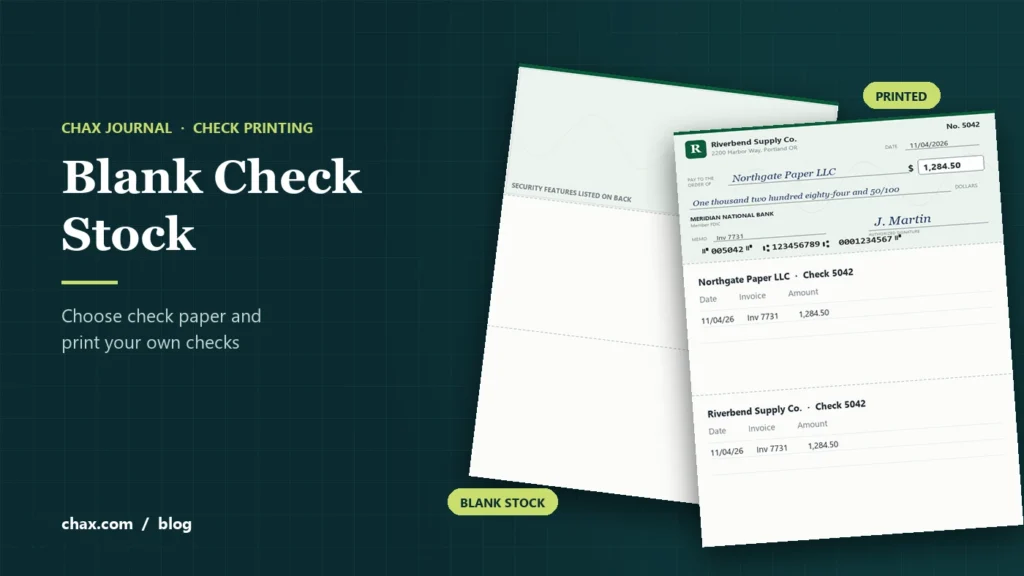
Blank check stock is security check paper with no bank information printed on it. Your check printing software adds everything at print time: your company name, the payee, the amount, the signature and the MICR line with your routing and account numbers.
To use it you need software that prints the full check, a laser printer and MICR toner. Because nothing on the paper is tied to one account, a single box of stock works for every bank account you write checks from.
What is blank check stock?
Check stock is the paper checks are printed on. It is usually letter size, 8.5 by 11 inches, perforated into a check and stubs, and built with security features that make copying or altering a check harder.
“Blank” means the sheet has the security background and perforations but no account details. That’s the difference from preprinted checks, which a check vendor prints with your bank, routing and account numbers before they ship.
| Blank check stock | Preprinted checks | |
|---|---|---|
| Bank details | Printed by your software at print time | Printed by the vendor before delivery |
| Bank accounts covered | Every account, from one supply | One account per box |
| Check numbers | Set by your software | Fixed on the paper, in sequence |
| If a box is stolen | No account number on the paper | Your account number is on every check |
| Change banks or address | Update a setting | Reorder; old stock is wasted |
| What you need | Check software, laser printer, MICR toner | Any printer your accounting software supports |
For a deeper look at the trade-offs, read blank check stock vs. preprinted checks.
Anatomy of a sheet of check stock
Check stock layouts: top, middle, bottom, 3-per-page and Z-fold
The layout must match what your software prints. Most accounting programs default to check-on-top voucher stock.
| Layout | What’s on the sheet | Best for |
|---|---|---|
| Check on top | Check, then two stubs | Vendor payments from QuickBooks and most accounting software |
| Check in the middle | Stub, check, stub | Programs and payroll services that place the check in the middle |
| Check on bottom | Two stubs, then the check | Software that prints the remittance detail first |
| 3 per page | Three checks, no stubs | High-volume runs where no remittance stub is mailed, such as refunds or check drafts |
| Z-fold (pressure seal) | A check and stub that fold into their own sealed mailer | High-volume payroll and vendor runs mailed without envelopes, using a pressure sealer |
Z-fold pressure seal checks
Z-fold checks are letter-size sheets that fold in a Z shape and seal shut, so the check becomes its own mailer. You print the check and stub on the inside with MICR toner, then run the sheet through a pressure sealer, which folds it and seals the edges with pressure-activated adhesive. The payee tears it open along the perforations.
They save stuffing envelopes by hand and keep pay amounts private, which is why payroll departments and high-volume offices use them. You need a pressure sealer, and your software has to print the Z-fold layout, so confirm both before you order.
See the types of checks for how these formats compare with personal, payroll and bank-issued checks.
Check stock security features
Security paper won’t stop every fraud, but it makes the two most common attacks, copying a check and changing what’s written on it, harder and easier to spot. That matters: checks were the payment type most often targeted by fraud in 2025, according to the Association for Financial Professionals.
Copy-void pantograph
A hidden pattern that shows “VOID” when the check is photocopied or scanned.
Erasure protection
The background turns white or discolors where someone erases or scrapes the amount or payee.
Microprinted border
A line of tiny text that looks solid to the eye and blurs into dots on a copy.
Simulated watermark
A mark printed on the back that shows when the check is held at an angle and doesn’t copy well.
UV-reactive fibers
Fibers in the paper that glow under ultraviolet light, so a bank or payee can confirm the paper is genuine.
Warning band and padlock icon
A border that tells the person handling the check which features to look for. The padlock icon, a mark from the Check Payment Systems Association, signals that the check has security features listed on the back.
Economy vs. premium security stock
Most suppliers sell two grades. At chax-store.com, for example:
| Economy value | Premium security | |
|---|---|---|
| Design | Single color | Multi-color prismatic |
| Erasure protection, microprinting, UV fibers | Yes | Yes |
| Copy-void protection | Copier void | Copy-void endorsement pantograph |
| Simulated watermark, anti-splice backer | No | Yes |
| Price, 500 sheets with 2 stubs | $45.99, about 9¢ a check | $51.99, about 10¢ a check |
| Choose it when | You print routine vendor checks in volume | You write large checks or have seen fraud attempts |
Prices from chax-store.com in November 2026. 3-per-page premium stock is $40 for 500 sheets, or 1,500 checks, about 3¢ a check.
What you need to print checks on blank stock
Check printing software
Software that prints the whole check, including your bank details and the MICR line, not just the payee and amount. MultiCHAX does this from QuickBooks, Sage 50 and other programs.
A laser printer
Any standard office laser printer that takes letter-size paper. The stock goes in the regular tray.
MICR toner
Toner with magnetic iron oxide. Bank sorters read the routing and account numbers magnetically, and checks printed with ordinary toner can be rejected or need manual repair. Shop MICR toner.
Blank check stock
Laser-compatible stock in the layout your software prints. Browse blank check stock.
How to print checks on blank stock
- Set up your bank account in the software. Enter the bank name, routing number, account number and starting check number. MultiCHAX includes a bank routing directory to look up your bank.
- Choose or design the check layout. Match the layout to your stock (top, middle, bottom or 3-per-page), then place your logo, address and signature.
- Test on plain paper. Print a sample, hold it behind a sheet of check stock against the light, and confirm every field lands inside the right area. Adjust the offsets if anything is off.
- Load the stock the right way up. Print one blank test page with an arrow to learn which side and edge your printer feeds first.
- Print the checks. Print from your accounting software or import a PDF it saved. Review the run before it prints, and void and log any spoiled sheet.
- Store the stock and reconcile. Keep unused stock locked away, and reconcile the account so any unknown check stands out.
Payroll works the same way: your payroll or accounting software sends the checks, and the software prints each one with its pay stub on the same voucher stock.
Blank doesn’t mean harmless. Unused stock carries no account number, but someone with your stock, software and account details could still print a convincing check. Keep it locked up, limit who can print, and ask your bank about Positive Pay, which matches each check it receives against a list you send.
Where to buy blank check stock
CHAX sells bank-ready blank check stock, MICR toner and check envelopes in its online store. Prices as of November 2026:
| Product | Price | Per check | |
|---|---|---|---|
| Top voucher checks, economy500 sheets, check on top, 2 stubs, single color | $45.99 | about 9¢ | Shop |
| Top voucher checks, premium security500 sheets, check on top, 2 stubs, multi-color | $51.99 | about 10¢ | Shop |
| Middle voucher checks500 sheets, economy or premium security | from $45.99 | about 9¢ | Shop |
| Bottom voucher checks500 sheets, economy or premium security | from $45.99 | about 9¢ | Shop |
| 3-per-page checks500 sheets, 1,500 checks, premium security, no stubs | $40.00 | about 3¢ | Shop |
| Z-fold pressure seal checks1,000 sheets, C41PS, needs a pressure sealer | $90.00 | about 9¢ | Shop |
| MICR tonerCartridges for HP and TROY laser printers | from $100 | — | Shop |
| Double window check envelopes1,000 per box, including QuickBooks and Quicken sizes | from $62 | — | Shop |
Larger orders get volume discounts. See all blank check stock.
Wherever you buy, check that:
- It’s made for laser printers, not inkjet.
- The layout and perforations match what your software prints.
- It has the security features you want, ideally with a warning band and padlock icon.
- It is sold blank, with no account or routing numbers.
- The paper weight meets your bank’s specs. Some banks, such as PNC, ask for 24 lb paper.
- You know the per-check price, not just the pack price, and whether larger orders get a discount.
MultiCHAX 11 prints complete checks on blank stock from QuickBooks, Sage 50, Quicken and other accounting software, including the MICR line, for every bank account you have. It also reads checks from PDFs saved by QuickBooks Online and Xero.
Plans start at $15 a month, $129 a year or $299 for a lifetime license. Try MultiCHAX 11 free.
Frequently asked questions
What is blank check stock?
Security paper for printing checks that has no bank or account information on it. Your check software prints those details, including the MICR line, when you print each check.
Is it legal to print your own checks on blank stock?
Yes. Businesses print their own checks every day. The check needs your correct bank details and a readable MICR line, and you can only print checks on accounts you are authorized to use. Ask your bank if it has specific requirements.
Do I need MICR toner to print checks?
You should use it. Bank equipment reads the routing and account numbers magnetically, and checks printed with regular toner can be rejected or sent for manual handling, which some banks charge for.
Can I print checks on blank stock with an inkjet printer?
Most blank check stock and MICR supplies are made for laser printers. Use a laser printer with MICR toner unless your bank and supplier confirm an inkjet setup works.
What is the difference between check stock and check paper?
Nothing, in practice. “Check stock,” “check paper” and “blank check paper” all describe the same perforated security paper.
Can I use blank check stock with QuickBooks?
Yes, with software that adds the bank details and MICR line. QuickBooks Desktop can print to MultiCHAX, and checks from QuickBooks Online can be imported from a saved PDF. Choose check-on-top voucher stock, the QuickBooks default.
How much does blank check stock cost?
At chax-store.com in November 2026, 500 sheets of voucher stock with two stubs cost $45.99 for economy or $51.99 for premium security, about 9¢ to 10¢ a check. 3-per-page stock costs about 3¢ a check, and Z-fold pressure seal checks are $90 for 1,000.
What are Z-fold checks?
Pressure seal checks printed on a letter-size sheet that folds in a Z shape into its own sealed mailer, so no envelope is needed. You print them with MICR toner and fold and seal them in a pressure sealer.
Sources
- 2026 AFP Payments Fraud and Control Survey Report, Association for Financial Professionals
- MICR fonts: why are they important?, TROY Group
- Check specifications form, PNC Bank Treasury Management
- Check Washing, U.S. Postal Inspection Service
- Blank business laser checks, product specifications and prices, chax-store.com
