Short answer
For most businesses, printing your own checks on blank check stock is cheaper, more flexible and safer to store than buying pre-printed checks. Blank stock carries no bank details until you print, one stock works for every bank account, and nothing goes to waste when your bank, address or signer changes.
You need three things: blank check stock with security features, a laser printer with MICR toner, and check printing software such as MultiCHAX 11.
Key takeaways
- Checks are still common: 83 percent of small firms used paper checks for business payments in the Federal Reserve’s 2024 business study.[1]
- Checks are also the payment most often hit by fraud: 63 percent of organizations reported attempted or actual check fraud in 2024.[2]
- Pre-printed checks carry your account and routing numbers on every sheet. A stolen box is a ready set of templates. Blank stock carries none.
- Intuit’s QuickBooks voucher checks cost 45 to 53 cents each in boxes of 500.[11] Blank business laser check stock costs about 9 to 10 cents a sheet.[12] Add MICR toner and software, then run your own numbers in the calculator below.
- Each bank account needs its own pre-printed stock, so swaps, orders and stock tracking grow with every account. One blank stock serves them all.
- Print the MICR line with MICR toner and follow the ANSI X9 standards banks use.[5][6]
Blank check stock vs. pre-printed checks: what is the difference?
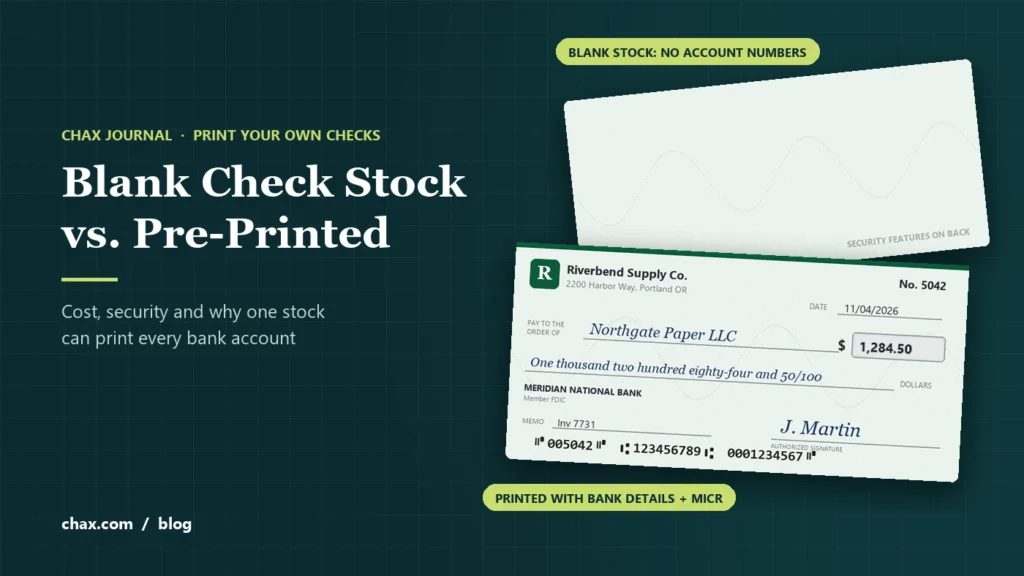
Pre-printed checks arrive from a check printer with your business name, bank name, routing number, account number and starting check number already printed. You order a separate supply for each bank account, and you reorder whenever any of that information changes.
Blank check stock is security paper laid out like a check, with no bank or account details. Check printing software adds everything at print time: your company details, the payee and amount, the signature if you use one, and the MICR line with your routing and account numbers.
Side-by-side comparison
| Pre-printed checks | Blank check stock | |
|---|---|---|
| Bank details on the paper | Printed on every check | None until you print |
| Bank accounts per stock | One | All of them |
| When your bank, address or logo changes | Remaining checks are scrapped | Change it once in the software |
| A stolen box | Ready-made checks with your account number | Paper with no account details |
| Ordering lead time | Proofs and shipping for each account | Keep one stock on hand |
| What you need | Any printer | Laser printer, MICR toner, software |
| Cost per check | 32 to 53 cents for Intuit voucher checks, by quantity and security level | Stock plus toner, about 15 cents with the calculator’s default inputs |
Why businesses still write checks
Checks have declined for years, but they have not gone away. In the Federal Reserve’s 2024 business study, 83 percent of small firms and about two-thirds of medium and large firms used paper checks for business payments.[1] The Atlanta Fed points to familiar approval routines, the cost and training needed to switch systems, remittance details that travel with a check, and cash-flow timing.[1]
If your office writes checks every week, how you print them is worth getting right.
New to printing checks yourself? Start with can you print your own checks, which covers what you need and the steps.
The real cost of pre-printed checks
The price on a check order is only part of what pre-printed checks cost. Watch for these costs too:
- One supply per account. Every bank account, and every company you pay from, needs its own boxes.
- Scrapped stock. A new bank, a moved office, a new logo or a new signer can make the rest of a box unusable.
- Reordering time. Proofs, approvals, receiving and logging check numbers take staff time on every order.
- Printer swaps. Changing stock between accounts means loading, test prints and alignment checks.
What pre-printed checks cost at Intuit
Intuit sells QuickBooks voucher checks, one check and two stubs per sheet, printed with your company and bank details. These are its listed prices:[11]
| Intuit voucher checks | 500 checks | 1,000 checks |
|---|---|---|
| Basic | $224.99 (about 45 cents each) | $317.99 (about 32 cents each) |
| Secure Plus, Intuit’s most popular | $264.46 (about 53 cents each) | $375.52 (about 38 cents each) |
Each box is printed for one bank account. Two accounts mean two orders, and a change of bank, address or logo means a new order. Other vendors charge different prices, so check your own last invoice too: divide it by the number of checks in the order.
The time cost grows with every bank account
Every bank account you pay from needs its own pre-printed stock. Each stock means more printer swaps, more orders and one more supply to count, lock up and track. Blank stock is one supply for every account, and the software switches accounts for you.
Here is a worked example with estimated times. It assumes 300 checks a month, two print runs per account each month, 3 minutes to change stock and test alignment, 20 minutes to order and receive a box, one box thrown away a year, and 10 minutes a month to manage each stock. Staff time is valued at $30 an hour. These are illustrations, not measurements, so put your own times in the calculator below.
| Bank accounts | Pre-printed checks | Blank stock |
|---|---|---|
| 1 | About 6 hours a year (about $190) | About 5 hours a year (about $140), whatever the number of accounts |
| 5 | About 19 hours a year (about $570) | |
| 20 | About 71 hours a year (about $2,130) |
With one account, the time difference is small. With 20 accounts, managing 20 separate stocks takes about 40 hours a year in this example, and stock swaps add 24 more. That is close to two working weeks spent on paper handling instead of paying bills.
What printing on blank stock costs
Blank stock replaces those separate supplies with one paper. In the CHAX Store, 500 sheets of business laser check stock cost $45.99 to $51.99, depending on the security level, or about 9 to 10 cents a sheet.[12] The same 500 sheets serve every bank account. MICR toner is the other running cost. It depends on your printer and cartridge yield, so check your cartridge’s rated page count. Software is a one-time or yearly cost that covers every account.
Cost calculator
What do your checks really cost?
Set these to match your office. The defaults are examples: 45 cents a check is Intuit’s Basic voucher check price for 500, and the minutes are estimates. Use your own numbers if they differ.
Your office
Pre-printed checks
Both methods
Blank stock
Pre-printed checks, per year
Blank stock, per year
Staff time saved: 7.9 hours a year
Estimates only. Shipping and fraud losses are left out. Each bank account needs its own pre-printed stock, so swaps, orders and stock tracking grow with every account. One blank stock serves them all. Software is the MultiCHAX 11 yearly plan for the edition your checks and accounts need.
Is blank check stock safer?
Check fraud is a real business problem. In the 2025 AFP Payments Fraud and Control Survey, 63 percent of organizations said they experienced attempted or actual check fraud in 2024, more than any other payment method.[2] FinCEN warned banks in 2023 about a nationwide surge in check fraud tied to mail theft.[4] It later reviewed six months of reports and found about $688 million in suspicious activity linked to that fraud.[3]
FinCEN found that stolen checks were most often altered and deposited (about 44 percent), used as templates for counterfeit checks (about 26 percent), or signed fraudulently and deposited (about 20 percent).[3] Pre-printed checks hand a fraudster the template: your bank’s name, your routing number and your account number, on every sheet in the box.
Blank stock changes the storage risk. Until you print, it carries no account information, so a lost or stolen box does not expose your accounts. Lock it up anyway, because the law expects ordinary care. Under the Uniform Commercial Code, a business whose carelessness substantially contributes to a forged or altered check can be barred from shifting that loss to the bank.[9]
What blank stock does not fix
Once a check is printed and mailed, it carries the same risk as any other check. The U.S. Postal Inspection Service advises mailing checks in blue collection boxes before the last pickup or at a Post Office, and never leaving mail in a mailbox overnight.[10] Reconcile your accounts often and ask your bank which fraud protection services it offers.
Security features to look for
Good business check stock layers several security features, such as microprinting, a void pantograph that shows “VOID” when copied, chemical-reactive paper, and a security warning box on the back. The padlock icon on many checks follows an ANSI X9 standard. It tells the person handling the check that security features are present.[7]
What you need to print checks on blank stock
- Blank check stock in the layout your software supports, for example check on top, middle or bottom with two voucher stubs.
- A laser printer and MICR toner. Bank equipment reads the MICR line at the bottom of the check. ANSI X9.100-20 sets the shape and magnetic signal of its E-13B characters, and X9.100-160-1 sets where the line sits.[5][6]
- Check printing software. It should print the MICR line correctly for each bank account and work with how you pay bills today. MultiCHAX 11 prints from QuickBooks Desktop, Quicken and other programs. It imports checks saved as PDF, for example from QuickBooks Online, and keeps their voucher stubs.
Will banks accept checks you print yourself?
Yes, when they are printed correctly. Banks clear most checks as images today. Under the Check 21 Act, a properly prepared substitute check made from those images is the legal equivalent of the original.[8] What matters is that the routing and account numbers, check number and amount can be read, starting with a MICR line printed to the X9 standards.[5] Before you switch for good, print a few test checks and ask your bank to review them.
When pre-printed checks still make sense
If you write a handful of checks a year from one account, have no laser printer, and never change banks, a single box of pre-printed checks may be simpler. The case for blank stock grows with the number of checks, bank accounts and companies you manage.
How to switch to printing your own checks
- Count your checks per month and the bank accounts you print on.
- Choose blank check stock in the layout you use today.
- Set up a laser printer with a MICR toner cartridge made for it.
- Install check printing software and enter each bank account once.
- Print test checks, compare them with a real check, and have your bank review them.
- Use up or securely shred your old pre-printed checks, and record their numbers.
- Store blank stock locked up, and limit who can print.
Try it with your own checks. MultiCHAX 11 prints checks on blank stock from your accounting software, for every bank account. Every feature works in the free trial, and trial checks print with a DEMO mark.
Frequently asked questions
Is it legal to print your own checks on blank stock?
Yes. A check does not have to come from a check printer. Banks process checks that carry the right information, including a correctly printed MICR line at the bottom. That line follows ANSI X9 standards for the E-13B characters and their placement, and it should be printed with MICR toner.
Do I need MICR toner?
Use it for the MICR line. The ANSI X9.100-20 standard covers the shape and magnetic signal of the E-13B characters that bank equipment reads. Regular toner can print a line that looks right but fails those tests, which can lead to rejected or manually handled items.
Will my bank accept checks printed on blank stock?
Most banks do, as long as the MICR line, routing and account numbers, and check layout are correct. Print a few test checks and ask your bank to review them before you switch for good.
Is blank check stock safer than pre-printed checks?
Blank stock carries no account or routing numbers, so a stolen box is not a ready-made set of your checks. Once a check is printed and mailed, it carries the same risk as any other check, so mail and storage habits still matter.
Can one box of blank stock work for several bank accounts?
Yes. The software prints each account’s bank details and MICR line at print time, so one stock can serve every account and company you pay from. With pre-printed checks, each account needs its own box.
What does it cost to print your own checks?
Blank business laser check stock costs about $46 to $52 for 500 sheets in the CHAX Store, or roughly 9 to 10 cents a sheet, plus MICR toner and software. Intuit lists its QuickBooks voucher checks at $224.99 to $264.46 for 500, or about 45 to 53 cents a check, and each box works for one bank account. Use the calculator on this page with your own numbers.
Sources
- Federal Reserve Bank of Atlanta, “Why Do Businesses Still Use Paper Checks?” (Jan. 12, 2026), on the 2024 Federal Reserve Payments Insight Business Study
- Association for Financial Professionals, 2025 AFP Payments Fraud and Control Survey, press release (Apr. 15, 2025)
- FinCEN, Financial Trend Analysis: Mail Theft-Related Check Fraud (Sept. 2024)
- FinCEN Alert FIN-2023-Alert003 on mail theft-related check fraud (Feb. 27, 2023)
- ANSI X9.100-20, print and test specifications for MICR (E-13B) characters
- ANSI X9.100-160-1, placement and location of MICR printing
- ANSI X9.100-170, check security padlock icon
- Federal Reserve Board, Regulation CC FAQ on the Check 21 Act
- Uniform Commercial Code § 3-406, Cornell Law School LII
- U.S. Postal Inspection Service, “Check Washing”
- Intuit Market, QuickBooks voucher checks, Basic and Secure Plus prices by quantity (checked Nov. 3, 2026)
- CHAX Store, blank business laser checks, 500 sheets (prices checked Nov. 2026)
Last reviewed November 2026. This article is general information, not legal or banking advice. Check with your bank before changing how you print checks.
