
Sage 50 vs. QuickBooks: Which is Better for Manufacturing & Distribution Check Printing?
For businesses in the manufacturing and distribution sectors, choosing the right accounting software is a critical decision. Your software needs to handle complex inventory, job costing, and specific industry workflows. The two most common contenders in this space are Sage 50 (formerly Peachtree) and QuickBooks Desktop (especially the Enterprise edition).
While both are powerful accounting systems, they have different strengths, and the best choice often depends on the specifics of your operations—including a task as fundamental as check printing.
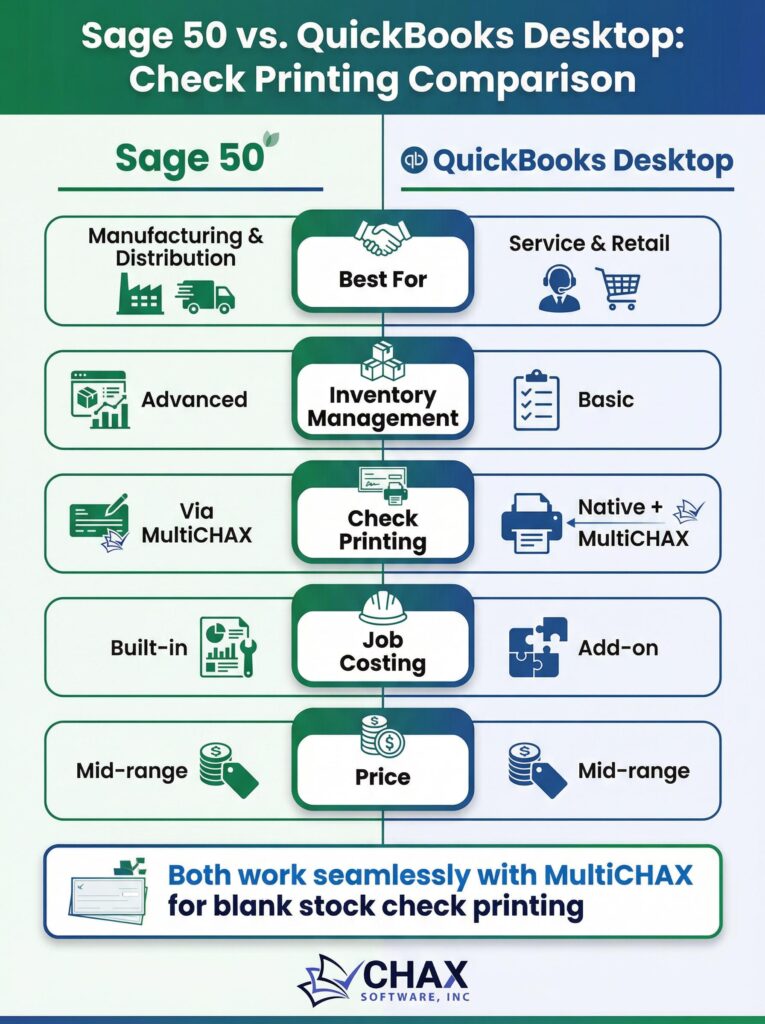
Core Strengths: Inventory and Job Costing
Sage 50: Traditionally, Sage 50 has been lauded for its superior inventory management capabilities out of the box. It offers more granular control over inventory items, including different costing methods (LIFO, FIFO, serialized) and more advanced assembly features. For businesses where inventory is the core of the operation, Sage 50 often feels more robust.
QuickBooks Desktop Enterprise: QuickBooks has made significant strides to catch up, particularly with its Enterprise edition. It now offers advanced inventory and job costing features, including mobile barcode scanning and landed cost calculations. Its user interface is often considered more modern and intuitive than Sage 50’s, which can be a major factor for team adoption.
The Check Printing Workflow: A Key Differentiator
Both platforms can, of course, print checks. However, the efficiency, security, and cost of that process can differ significantly, and neither platform offers a perfect native solution for printing on blank check stock.
The Challenge:
Both Sage 50 and QuickBooks Desktop are primarily designed to print on expensive, pre-printed check stock. Neither has the built-in capability to create the secure, bank-compliant MICR line required for printing on blank checks. This means that, out of the box, users are locked into a costly and insecure check printing method.
The Universal Solution: A Third-Party Virtual Printer
Because both platforms suffer from the same fundamental limitation, the best solution for both is the same: a universal check printing software that works as a virtual printer. An application like MultiCHAX is platform-agnostic and can integrate seamlessly with both Sage 50 and QuickBooks.
Here’s how it levels the playing field:
1. Identical Workflow: The process becomes identical for both systems. You initiate the print job from within your accounting software (whether it’s Sage or QuickBooks) and select the MultiCHAX virtual printer.
2. Centralized Control: The MultiCHAX software handles all the sensitive parts of the process. It stores the secure bank account templates, generates the MICR line, and adds digital signatures.
3. Platform Independence: Because the check printing logic is handled by MultiCHAX, the choice between Sage 50 and QuickBooks can be made based on your core accounting needs (inventory, job costing, user interface) rather than being constrained by a printing workflow.
The Verdict: Choose Based on Core Needs, Not Printing
When it comes to check printing for manufacturing and distribution, there is no clear winner between Sage 50 and QuickBooks, because neither is sufficient on its own. Both require a third-party solution to enable a modern, secure, and cost-effective workflow based on blank check stock.
Therefore, your decision should be based on other factors:
- Choose Sage 50 if: Your business requires highly detailed, serialized inventory tracking and you prefer its more traditional, robust accounting structure.
- Choose QuickBooks Desktop Enterprise if: You value a more modern user interface, need strong mobile warehouse management features, and have a team that is already familiar with the QuickBooks ecosystem.
Regardless of which you choose, the next step should be to implement a universal check printing solution like MultiCHAX. This will ensure that, whichever accounting platform you use, your payment operations are secure, efficient, and as cost-effective as possible.