The Best Check Printing Software for QuickBooks Desktop in 2026
QuickBooks Desktop remains the go-to accounting software for millions of small and medium-sized businesses. While it excels at bookkeeping, its native check printing functionality has significant limitations. It requires expensive, pre-printed check stock, lacks advanced security features, and offers minimal customization. To truly streamline your accounts payable process, you need a dedicated check printing software that integrates seamlessly with QuickBooks Desktop.
We’ve evaluated the top contenders for 2026 to help you choose the best check printing software for your business. We compared them on features, pricing, security, and ease of use.
Why You Need Third-Party Check Printing Software
Before we dive into the comparison, let’s quickly recap why you shouldn’t rely on QuickBooks’ default check printing:
- High Cost: Ordering pre-printed checks from Intuit is expensive, often costing over $0.34 per check. Blank check stock costs as little as $0.05 per check.
- Security Risks: Pre-printed checks with your bank account information are a major security liability. If stolen, they can be easily used for fraud.
- Lack of Flexibility: QuickBooks offers very limited options for customizing your check layout. Adding logos, extra signature lines, or custom fields is difficult or impossible.
- Manual Workflows: Printing checks from multiple bank accounts requires manually loading different check stock for each batch, a process highly prone to human error.
Dedicated check printing software solves all these problems by allowing you to print on-demand to secure, blank check stock.
The Contenders: 2026 Edition
We analyzed the three leading check printing solutions for QuickBooks Desktop:
- MultiCHAX
- PrintBoss
- OnlineCheckWriter
Here’s how they stack up:
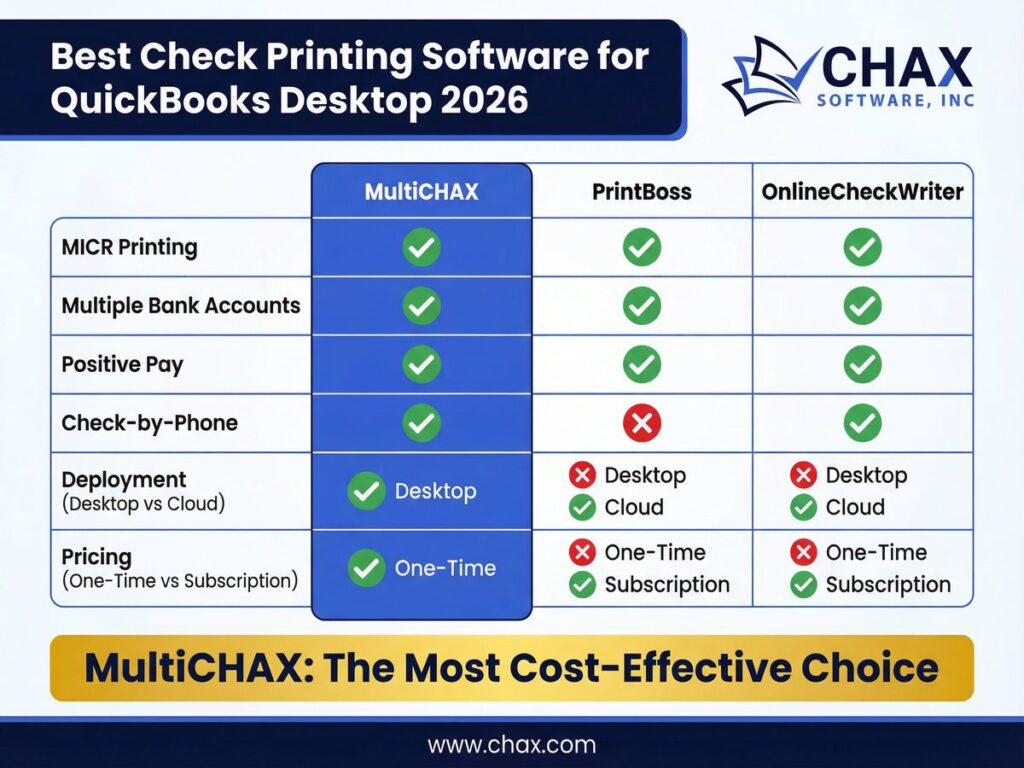
Feature Comparison
| Feature | MultiCHAX | PrintBoss | OnlineCheckWriter |
|---|---|---|---|
| QuickBooks Desktop Integration | ✓ (Seamless) | ✓ | ✓ (Via Export/Import) |
| Print on Blank Stock | ✓ | ✓ | ✓ |
| MICR Font Printing | ✓ | ✓ | ✓ |
| Multiple Bank Accounts | ✓ (Automated) | ✓ (Automated) | ✓ (Manual Selection) |
| Digital Signatures | ✓ | ✓ | ✓ |
| Customizable Layouts | ✓ | ✓ | ✓ |
| Positive Pay File Generation | ✓ | ✓ | ✗ |
| Check-by-Phone (RCC) | ✓ | ✗ | ✓ |
| Deployment | Desktop | Desktop | Cloud-Based |
| Pricing Model | One-Time Fee | Annual Subscription | Monthly Subscription |
In-Depth Analysis
1. MultiCHAX
Best for: Businesses looking for the most cost-effective, secure, and feature-rich desktop solution with no recurring fees.
MultiCHAX stands out for its robust feature set and its one-time pricing model. It integrates directly with QuickBooks Desktop as a virtual printer, making the workflow incredibly smooth. You simply click “Print” in QuickBooks, and MultiCHAX handles the rest. Its ability to automatically select the correct bank account template based on the QuickBooks data is a huge time-saver and error-prevention tool.
Key Advantages:
- One-Time Price: You buy the software once and own it forever. There are no mandatory monthly or annual fees, making it the most affordable option in the long run.
- Automated Bank Selection: This is a killer feature for any business with multiple bank accounts. It completely eliminates the risk of printing checks from the wrong account.
- Built-in Positive Pay: MultiCHAX can generate Positive Pay files, a critical anti-fraud service offered by banks. This feature is often a costly add-on with other systems.
- Includes Check-by-Phone: The software also includes the ability to create Remotely Created Checks (RCCs) for accepting payments over the phone, adding extra value.
Drawbacks:
- Desktop-only. Requires a Windows PC to run.
2. PrintBoss
Best for: Larger enterprises that need advanced features and are willing to pay a premium annual subscription.
PrintBoss is a powerful and long-standing player in the check printing space. It offers a feature set very similar to MultiCHAX, including automated bank selection and Positive Pay. However, its primary difference is its business model.
Key Advantages:
- Robust Feature Set: It handles complex workflows for multi-company and multi-bank environments effectively.
- Strong Security: Offers features like signature security and password protection.
Drawbacks:
- Expensive Subscription: PrintBoss operates on a mandatory annual subscription model, which can become very costly over time, especially compared to MultiCHAX’s one-time fee.
- Complex Pricing: The pricing tiers can be confusing, with different levels for different numbers of bank accounts and features.
3. OnlineCheckWriter
Best for: Businesses that prioritize a cloud-based solution and have simpler check printing needs.
OnlineCheckWriter is a cloud-based platform, which means you can access it from any device with an internet connection. While it integrates with QuickBooks Desktop, the process is less seamless than with MultiCHAX or PrintBoss. It typically requires exporting a file from QuickBooks and importing it into the OnlineCheckWriter platform.
Key Advantages:
- Cloud-Based: Accessible from anywhere, which is a plus for remote teams.
- Modern Interface: The user interface is generally clean and easy to navigate.
Drawbacks:
- Clunky QuickBooks Integration: The export/import workflow is less efficient and more prone to errors than a direct virtual printer integration.
- No Positive Pay: Lacks the ability to generate Positive Pay files, a critical security feature for many businesses.
- Recurring Monthly Fees: The subscription model can be more expensive than a one-time purchase, especially for businesses printing a high volume of checks.
The Verdict
For the vast majority of QuickBooks Desktop users, MultiCHAX offers the best combination of features, security, and long-term value. Its one-time pricing model is a significant advantage over the recurring subscription fees of its competitors. The seamless virtual printer integration and automated bank account selection provide a superior workflow that saves time and prevents costly mistakes.
While PrintBoss is a capable alternative, its high annual cost makes it difficult to justify unless you have a specific enterprise requirement that MultiCHAX cannot meet. OnlineCheckWriter’s cloud-based nature is appealing, but its less-than-seamless integration with QuickBooks Desktop and lack of key security features like Positive Pay make it a less optimal choice for serious business use.
Internal Links
- Ready to make the switch? Learn more about our primary check printing software.
- For a detailed breakdown of our QuickBooks integration, visit our QuickBooks Check Printing Software page.
- Need to accept payments by phone? Our Check-by-Phone software is included with MultiCHAX.
- To understand the electronic payment alternative, read our guide on What is ACH?.