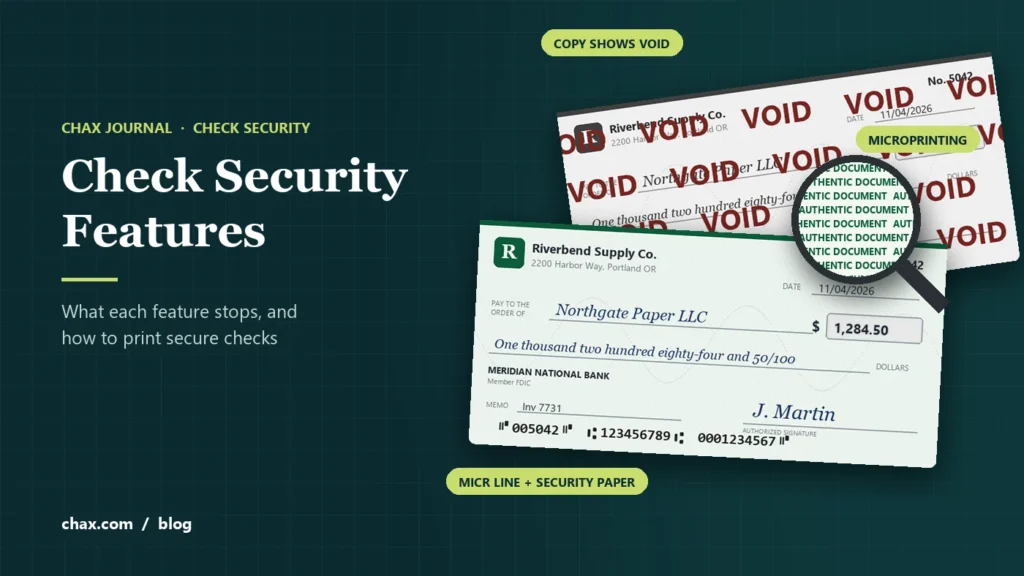
Check security features are built into the paper, the printing and your process to make checks hard to copy, alter or forge. The most useful are a copy-void pantograph, microprinting, chemical-reactive paper, toner anchorage, a heat-sensitive icon, a security warning band and a clean MICR line printed with magnetic toner.
Paper alone isn’t enough. Secure check printing also means controlling who can print, storing stock under lock, setting check limits, reconciling often and using your bank’s Positive Pay.
Why check security still matters
Checks remain the payment type criminals target most. Stolen checks are washed and rewritten, scanned and reprinted, or used as a template for counterfeits.
FinCEN’s February 2023 alert tied much of that rise to checks stolen from the mail. For the full prevention playbook, including Positive Pay and what to do if you’re hit, see how to prevent check fraud. This guide covers the checks themselves and how you print them.
Check security features, explained
| Feature | What it stops | How to check it |
|---|---|---|
| Microprinting | Copying and scanning | The border looks like a solid line but reads as tiny text under a magnifier. On a copy it blurs. |
| Copy-void pantograph | Photocopies and scans | A hidden “VOID” pattern appears on any copy. |
| Chemical-reactive paper | Check washing with solvents or bleach | Chemicals stain or discolor the paper where they touch it. |
| Toner anchorage | Lifting or scraping laser toner | A coating bonds toner to the fibers, so scraping leaves visible damage. |
| Erasure protection | Rubbing out the payee or amount | The background turns white or discolors where it’s erased. |
| Heat-sensitive (thermochromic) icon | Counterfeits on plain paper | Rub or breathe on it: the icon fades, then returns as it cools. |
| Simulated or true watermark | Counterfeits and copies | Hold the check at an angle or up to the light. |
| UV-reactive fibers | Counterfeit paper | Fibers glow under ultraviolet light. |
| Padlock icon and warning band | Tellers missing the features | The padlock, a Check Payment Systems Association mark, says the features are listed on the back. |
| Foil hologram | High-quality counterfeits | Found on some high-security stock. It shifts as you tilt it and doesn’t copy. |
| MICR line in magnetic toner | Rejected or misread checks | Printed in E-13B characters with MICR toner so bank sorters can read it. |
Most blank check stock combines several of these. Premium grades add the copy-void endorsement pantograph, a simulated watermark and an anti-splice backer. Compare grades in our guide to blank check stock.
Three layers of check security
The paper
Security stock with the features above makes copying and altering harder, and makes tampering visible to the bank and the payee.
The printing
Laser printing with MICR toner fuses the payee and amount into the paper, and software controls what gets printed and by whom.
The process
Locked storage, split duties, check limits, quick reconciliation and Positive Pay catch what slips past the paper.
How to print secure checks: a checklist
- Use security check stock. Choose laser stock with a warning band and several features from the table, and pick premium security if you write large checks or have seen fraud attempts.
- Print the full check on blank stock. Blank stock carries no account number until it prints, so a stolen box doesn’t expose your account the way preprinted checks do.
- Use a laser printer and MICR toner. Laser toner fuses to the paper and is harder to wash than ink, and MICR toner keeps the bank line readable.
- Limit who can print, and how much. Give printing rights only to the people who need them, restrict each person to the bank accounts they use, and set a maximum check amount.
- Split duties. The person who prints checks shouldn’t approve them or reconcile the account.
- Lock up stock and signatures. Keep blank stock, MICR toner and any signature files secured, and log what’s used.
- Keep a record of every check. Your software should log each printed check with who printed it and when, and voided or spoiled checks should be recorded too.
- Mail checks securely. Use a post office or a secure mailbox, not an unattended outgoing tray. The U.S. Postal Inspection Service recommends this because check washing often starts with stolen mail.
- Reconcile often and use Positive Pay. Reconcile daily or weekly, and send your bank a list of issued checks so it can flag any mismatch.
- Keep software and printers updated. Use supported software with user passwords, and retire printers that can’t handle MICR toner reliably.
Check printing mistakes to avoid
| Mistake | Why it matters | Fix |
|---|---|---|
| Printing on plain paper or weak stock | Easy to copy and alter, and some banks reject it | Use security check stock that meets your bank’s specs |
| Skipping MICR toner | The bank line may be misread, causing rejects or repair fees | Print the MICR line with MICR toner |
| Leaving stock and toner unlocked | Insiders or thieves can print convincing checks | Lock it up and track usage |
| Wrong amount, payee or date | Voids, reissues and payment disputes | Review every check before it prints |
| Missing or loose signature control | Unsigned checks bounce; shared signature files invite misuse | Limit who can apply signatures, and log it |
| Not voiding spoiled checks | A misprint in the trash is still a usable check | Mark VOID, record the number and shred it |
| Ignoring your bank’s guidelines | Checks that don’t meet specs can be rejected | Ask your bank for its check specifications and test first |
| Printing without enough funds | Returned checks, fees and vendor trust | Check balances before a print run |
| Rushing big print runs | Errors and duplicate checks slip through | Use a review step and check limits |
| Reconciling only monthly | Fraud goes unnoticed past your bank’s deadlines | Reconcile weekly or daily, and use Positive Pay |
How to check a check you receive
The same features help you spot a fake. Look for the warning band and padlock, rub the heat-sensitive icon, check the microprinted border, and look for stains or discoloration around the payee and amount. Be wary of any check for more than you’re owed. For bank-issued checks, see how to spot a fake cashier’s check.
Features help, but they aren’t proof. Counterfeiters can buy security paper too. If a check looks wrong or the deal feels rushed, confirm it with the issuing bank using a phone number you look up yourself.
MultiCHAX 11 prints complete checks on blank security stock with the MICR line, and adds controls that cover the process layer: users and permissions by bank account, a maximum check amount for each user, held checks that never print until they’re reviewed, and a transaction log of every printed check. Enterprise adds a secure amount font.
Need supplies? Shop security check stock and MICR toner, or try MultiCHAX 11 free.
Frequently asked questions
What are the most important check security features?
A copy-void pantograph, microprinting, chemical-reactive paper, toner anchorage, a heat-sensitive icon and a warning band cover the most common attacks: copying, washing and altering. A MICR line printed with magnetic toner keeps the check readable by banks.
Can I print checks on regular printer paper?
Some banks will process them, but you shouldn’t. Plain paper has no security features, so the check is easy to copy or alter, and it may not meet your bank’s specifications.
What is check washing?
Using chemicals to remove the payee and amount so a thief can rewrite them. Chemical-reactive paper, toner anchorage and laser printing make it harder, and secure mailing keeps checks out of thieves’ hands.
Do security features stop all check fraud?
No. They make fraud harder and easier to spot. Combine them with controls on who can print, frequent reconciliation and Positive Pay.
Does MICR toner make checks more secure?
MICR toner mainly keeps the bank line readable by sorting equipment. It helps security indirectly, because laser toner bonds to the paper and is harder to wash than ink.
What is the padlock icon on checks?
A mark from the Check Payment Systems Association that tells tellers and payees the check has security features, which are listed on the back.
Sources
- 2026 AFP Payments Fraud and Control Survey Report, Association for Financial Professionals
- FinCEN Alert on Nationwide Surge in Mail Theft-Related Check Fraud Schemes, FIN-2023-Alert003, February 27, 2023
- Check Washing, U.S. Postal Inspection Service
- MICR fonts: why are they important?, TROY Group
- Security check stock specifications, chax-store.com
