
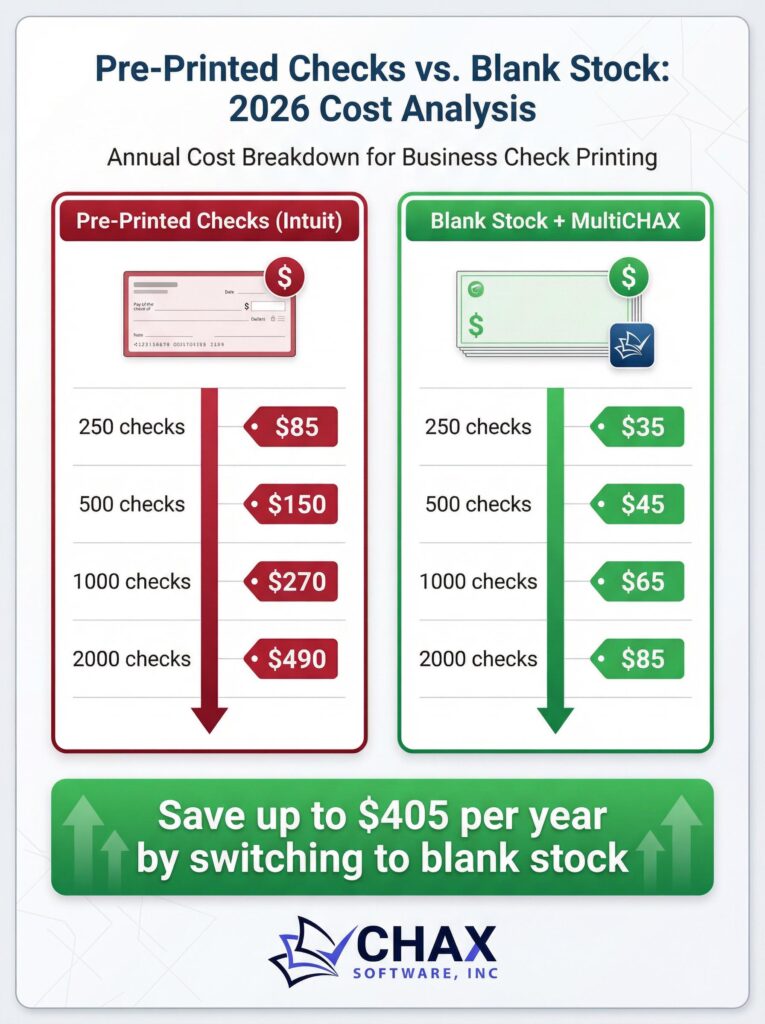
QuickBooks Desktop Check Printing: Pre-Printed vs. Blank Stock (2026 Cost Analysis)
For businesses using QuickBooks Desktop, managing check payments is a routine part of the accounts payable process. However, the method you choose for printing those checks can have a significant impact on your bottom line. The traditional approach of ordering expensive, pre-printed checks from Intuit is being challenged by a more modern, secure, and cost-effective alternative: printing on blank check stock with a solution like MultiCHAX.
This analysis breaks down the real costs associated with both methods in 2026 to show why making the switch is one of the smartest financial decisions a business can make.
The True Cost of Pre-Printed Checks
When you order pre-printed checks, you are paying for more than just paper. The cost includes the printing of your company logo, address, and, most importantly, your bank account and routing numbers. Let’s look at a typical cost scenario.
As of early 2026, ordering standard voucher checks directly from Intuit for QuickBooks costs approximately:
- 500 Checks: ~$225.00 (or $0.45 per check)
- 1000 Checks: ~$350.00 (or $0.35 per check)
This cost doesn’t even include shipping, and it multiplies if your business uses multiple bank accounts, requiring separate, expensive orders for each one.
The Cost of Printing on Blank Check Stock
The alternative is to use blank check stock, which is essentially high-security paper with no pre-printed information. The check details are printed on demand using your existing laser printer, a MICR toner cartridge, and a QuickBooks check printing software.
Here is the cost breakdown for this method:
1. Blank Check Stock: A pack of 1000 high-security blank checks can be purchased for around $80.00 (or $0.08 per check).
2. MICR Toner: A MICR toner cartridge, which is required for bank compliance, costs about $150 and yields approximately 3,000 checks ($0.05 per check).
3. Software: A one-time license for a robust software like MultiCHAX is around $249.
Cost Comparison: 1,000 Checks
Let’s compare the total cost for printing 1,000 checks for a single bank account:
| Item | Pre-Printed Checks (Intuit) | Blank Check Stock (MultiCHAX) |
| :— | :— | :— |
| Checks | $350.00 | $80.00 |
| MICR Toner | $0.00 | $50.00 (1/3 of cartridge) |
| Software (One-Time) | $0.00 | $249.00 |
| First Year Total | $350.00 | $379.00 |
| Cost Per Check (Year 1) | $0.35 | $0.38 |
At first glance, the costs seem comparable in the first year due to the one-time software purchase. However, the real savings begin in year two and beyond.
The Long-Term Savings
Let’s look at the cost of the next 1,000 checks:
| Item | Pre-Printed Checks (Intuit) | Blank Check Stock (MultiCHAX) |
| :— | :— | :— |
| Checks | $350.00 | $80.00 |
| MICR Toner | $0.00 | $50.00 |
| Software | $0.00 | $0.00 (Already owned) |
| Subsequent Year Total | $350.00 | $130.00 |
| Cost Per Check | $0.35 | $0.13 |
By the second batch of 1,000 checks, your business is saving $220.00, a reduction of over 60%. The savings only grow over time and are even more dramatic for businesses with multiple bank accounts, as they can use the same software and blank check stock for all of them without incurring additional costs.
Beyond the direct financial savings, printing on blank stock offers superior security and flexibility, making it the clear choice for any modern business using QuickBooks Desktop.